Yuhox Pass.
Bring card readers, face terminals and scanners into one hub for membership identification, redemption and charging.
How to start
See the price and order
After payment, the license appears under Console → My licenses. Nothing is issued until the money arrives.
Collect the license in the software
In System settings → License, click “Get license with Yuhox account”. You do not copy a license code.
Machines without internet
Use Console → Offline activation / transfer. The license code is a secret; it is masked by default.
What it solves
On-site devices are never bought in one batch. The front-desk TCP card reader has been there five years. The turnstile from the fit-out speaks Modbus. The new face terminal only sends HTTP. The old warehouse unit only accepts UDP. This year the group requires MQTT. So each device type gets its own software, data lands in five places, month-end reconciliation never matches, and nobody can say which record is which. Yuhox Pass takes over all five protocols at once and writes them into one database, one ledger, and one admin.
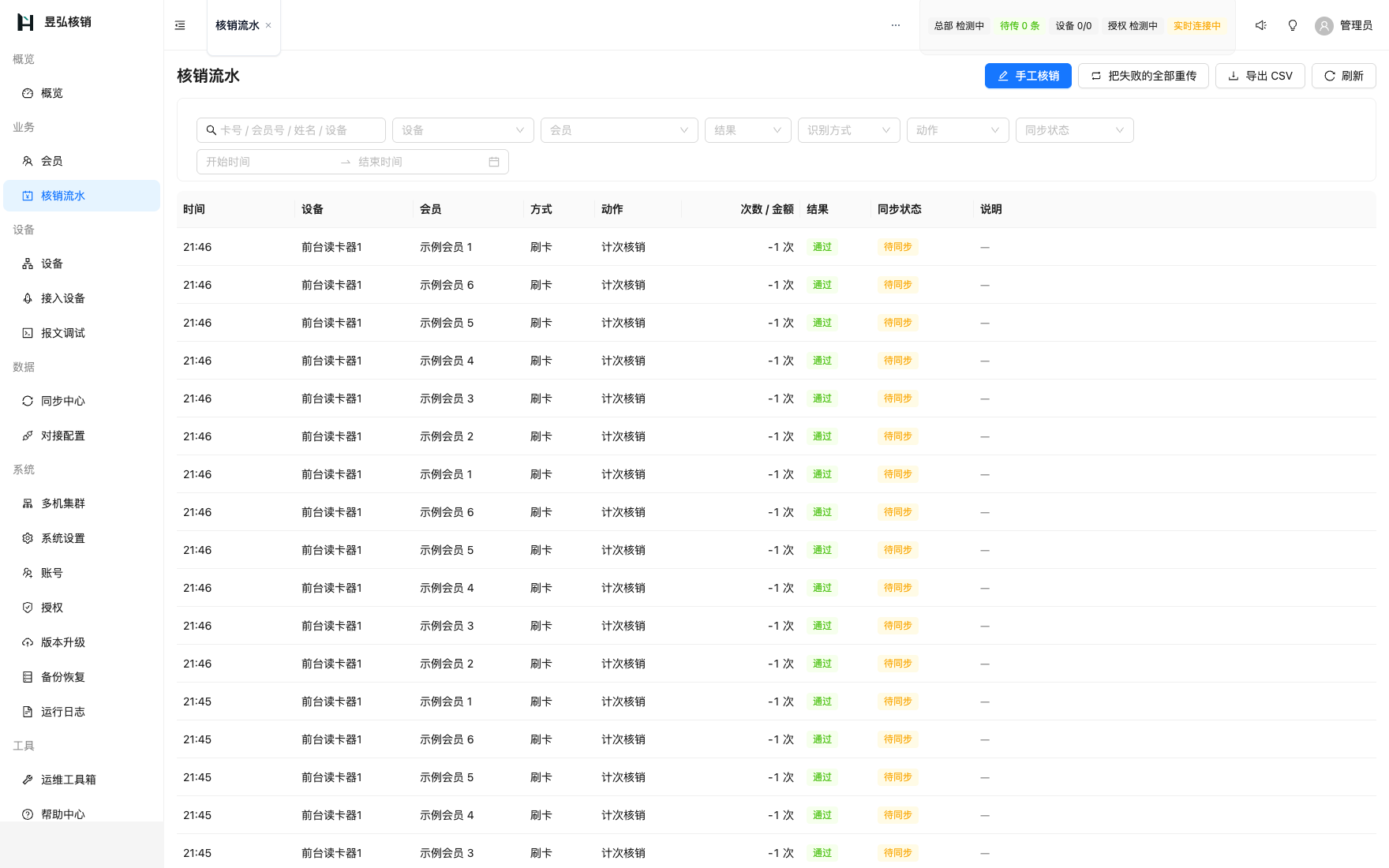
Before and now
| Before | Now |
|---|---|
| Five protocols, five software stacks, data scattered in five places | Takes over five protocols at once into one database, one ledger, and one admin |
| A new model means waiting for the vendor to ship a release, while the site sits idle | How frames are split, which bytes hold the card number, how the checksum is calculated: all described in backend config, and changes take effect immediately |
| When the network drops, business stops and the front desk has to register by hand | Book locally and charge as usual; auto-upload and reconcile when the network returns |
| Transactions do not reconcile; refunds and exceptions are mixed together | Identify, charge, and let through are one complete transaction. Redemption, refunds, and exceptions are separate classes. Export and they are ready to book. |
| Installing a system means setting up a server, installing a database, and having someone who knows operations | One executable, no dependencies, all platforms, ready on the LAN |
Core capabilities
- 01
Five protocols in one
TCP, UDP, HTTP, Modbus and MQTT connect in parallel, and the built-in MQTT broker means you do not install another. New device models come in through message templates: paste one message and it works out which template to use, without waiting for a release.
- 02
Face terminal integration
Hikvision face terminals can be added one by IP, or a whole address range scanned to find them all; the reporting address is configured automatically and follows the machine when its IP changes. Unrecognized faces and cards go to "Pending binding", and the front desk binds one to a member with a click.
- 03
Card readers wired up on one page
Broadcast device discovery does not care about subnets, and the configuration check names the field that is wrong and what it should be, then fixes it and reboots in one click. No vendor configuration tool and no serial debugger.
- 04
Members and billing
Punch cards, stored-value cards and term cards all coexist, with duplicate-swipe protection, daily caps, time-window and device-group permissions, and an overdraft allowance. A manual adjustment requires a reason and stays in the ledger for audit.
- 05
Keeps running offline
Member data is cached on the machine, so recognition, punch deduction and access control carry on when the network drops. Ledger entries queue for upload, and however many times one is resent it is booked only once. The sync center shows at a glance how much is still waiting to upload.
- 06
Mutual backup between machines
The LAN discovers nodes automatically, satellite ledgers roll up to the host, and any machine can be promoted to host. When the host cannot reach the network, it borrows an online node to forward, with several lines sharing the load.
- 07
Operations toolbox
The one-click health check gives repair advice in Chinese; the message debug bench shows what a device actually sent; look a MAC address up to find which switch port it sits on and restart its PoE power remotely; the troubleshooting wizard asks one step at a time and checks automatically.
- 08
Voice announcements
"Zhang San, one consumption, nine left" is generated entirely on the machine, so it still plays when the network drops and the front desk does not have to watch the screen.
- 09
Install and use it right away
One executable, zero dependencies, running on Windows, Linux, macOS, domestic platforms and ARM industrial PCs; there is a Windows desktop client, and it can be installed as a service that starts on boot. A four-step wizard gets you going, and a phone QR code opens the admin console.
- 10
Upgrades and machine moves
Update checks download only what changed, with signature verification and automatic rollback on failure, so your data and license are unaffected. To change computers, use a migration package; it takes the member avatars with it.
Who it is for
Venues, campuses, canteens, bathhouses, gyms
Membership identification and redemption charging must be accurate; going offline cannot stop the business
Sites with mixed models accumulated over years
Do not want to replace working old equipment just to go live
Subsidiaries required by the group to upload data
Keeps running locally while reporting upward in the protocol the group requires
Why this one
Being offline is the norm, not an exception
Book locally first, upload after recovery. Those entries are marked "delayed report" and take part in reconciliation; they are not treated as duplicates. This is not a patch; it was designed this way from the start.
New models do not wait for a release
Integration runs on message templates: framing, which position the value is read from, encoding, checksums — all configuration items. Meet an unseen device on site and you can connect it the same day.
One file and it runs
Zero external dependencies: no separate database, no server setup, one executable that starts with a double-click. Installation takes minutes.
Works on domestic platforms
Windows、Linux x64、ARM64 国产系统同一套程序。
Same job, two ways
The left column is how most sites work today — no vendor names. The right column is what the current version actually does.
| Topic | Common practice | Yuhox Pass |
|---|---|---|
| Many device types | One app per protocol; month-end books never match | Five protocols in one hub, one database, one ledger |
| New models | Wait for the vendor to ship a build | Message templates are configured in admin and take effect immediately |
| Network down | The front desk stops and switches to paper | Local ledger keeps charging; when the network returns, it backfills and reconciles |
| Install | Set up a server and database first, then install a pile of dependencies | One executable. Install on the LAN and run |
Key parameters
| Access protocols | TCP / UDP / HTTP / Modbus / MQTT |
|---|---|
| Deployment modes | Single executable, zero dependencies |
| Storage | Embedded single file, no separate database to install |
| Platform | Windows / Linux x64 / ARM64 domestic OS |
| Offline | Book locally, auto-upload when the network returns |
Up front
Our device protocol is unusual. Can you connect it?
See which class it belongs to. If it uses one of these five transports, and the message format can be described in the admin, it can be connected. If it truly cannot, it is using an encrypted private protocol, and you have to go to the vendor.
Are charges accurate while offline?
Deductions run locally under the same rules, and the transaction log stays complete. The risk is the same member spending at two offline points at once; after reconnecting, the balance may end up overdrawn. The system flags this case, and business rules decide how to handle it.
Can it connect to our existing membership system?
Yes. Yuhox Pass handles identification and redemption; member master data can be synced from your system, or confirmed with your system in real time at the moment the card is swiped.
How do I buy it and put it on a device?
Order a pack on the site. After payment the license appears under My licenses. In the software, Get license with Yuhox account. Offline machines use offline activation.
How many licenses does one shop need?
Packs bundle people, devices, and nodes into one tier. Check the pricing page and count your site before you buy.
Can we try it first?
Yes. Apply on the contact page; after we check, we send the trial license to the email you left.
Hard constraints in the system
These are gates in the software — even a code change is not allowed to remove them. What is in the contract still governs.
The free tier is permanent
You can keep using it without buying a license, with every feature open; only the scale is limited. Paying only raises the headcount, device and node limits.
No shutdown at expiry
When the annual fee expires you fall back to the free tier, and not one member, ledger entry or setting is touched.
The data is in your hands
Data lives in a single-file database on the machine, which you can copy or back up at any time. With no network at all it is still a complete product.
One account, multiple systems
If you use several Yuhox systems, one account covers them all. No separate accounts or passwords per system.
How many device types are on site
List the brands and models. We will judge which can connect directly and which need a packet capture on site.